A Sankey diagram shows how a quantity moves between stages, such as energy from fuels to uses, money from income to spending, or visitors from pages to sign-ups. Each flow is drawn as a band whose width is proportional to its size. To make one, you need a table with three columns, From, To and Value, with one row per flow.
Where the name comes from
The diagram is named after Captain Matthew Henry Phineas Riall Sankey, an Irish engineer, who used one in 1898 to show how much of a steam engine’s energy was lost at each stage (Wikipedia). Charles Minard had drawn flows of the same kind decades earlier, most famously in his 1869 map of Napoleon’s march on Moscow.
The data layout
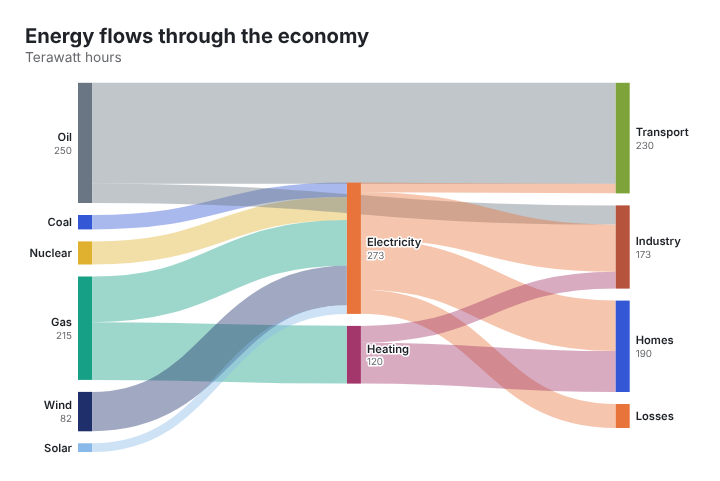
Each row is one flow between two nodes. This is the example in the JFDI chart maker, showing energy flowing through an economy (illustrative figures, in terawatt hours):
| From | To | Value |
|---|---|---|
| Gas | Electricity | 95 |
| Gas | Heating | 120 |
| Wind | Electricity | 82 |
| Oil | Transport | 210 |
| Electricity | Homes | 105 |
| Electricity | Losses | 50 |
A node can be a target in one row and a source in another. Electricity receives flows from gas, wind and other fuels, then sends flows on to homes, industry and losses. The chart works out the stages from that.
Step by step
- Open the chart maker and type sankey in the search box, then click Sankey diagram.
- Replace the example data on the Data step. Paste your three columns straight from Excel or Google Sheets, with a header row.
- Check the totals. Wherever a node has flows both in and out, the two sides should add up, or the difference should go to a node such as Other or Losses.
- Style it on the Format step: title, colours, and node width and spacing.
- Export it as PNG, SVG or PDF, or copy the embed code for a website. The interactive embed shows each flow’s value on hover.
Nothing you paste is uploaded. The chart is drawn by your browser.
Tips for a readable Sankey
- Keep it to about 15 to 20 nodes. Beyond that, bands get too thin to read. Group small items into Other.
- Make it balance. A node that receives 300 and sends on 250 looks wrong. Show the missing 50 explicitly, often as Losses or Unallocated.
- Use the same units throughout. Mixing percentages and totals breaks the widths.
- Put the story in the title. “Half of all gas goes to heating” beats “Energy flows”.
When to use something else
| If you want to show | Try |
|---|---|
| How one total breaks down, one level | Bar chart or treemap |
| Gains and losses from a start value to an end value | Waterfall chart |
| How people move between categories over several stages (for example, survey answers in two years) | Alluvial chart |
| Steps in a sign-up or sales funnel, with drop-offs | Funnel Sankey |
| Revenue flowing to costs and profit | Income statement chart |
All of these are in the chart maker’s Flow and process family.
Common questions
Can a flow go backwards?
Not in a standard Sankey: flows run left to right through stages. Loops (A to B to A) confuse the layout, so split repeated stages into separate nodes, such as Year 1 and Year 2.
Can I use negative values?
No. A band can’t have negative width. Show reductions as flows to a node such as Losses or Refunds.
Is it free to use commercially?
Yes. Charts you make are yours, with no watermark and no credit required.