A choropleth map shades each area, such as a country, state or council, according to a value, with darker colours usually meaning more. It’s the most common kind of data map. It works well for rates (per person, per km², percentages) and badly for totals, because big areas look important just for being big.
Where the name comes from
The word comes from the Greek choros (area) and plethos (multitude). The geographer John Kirtland Wright coined it in 1938, but the idea is much older: Baron Pierre Charles Dupin drew a map of France in 1826 shading each département by access to basic education, usually counted as the first choropleth (Wikipedia).
Mistake 1: mapping totals
Shade a world map by total population and China and India are darkest, which is true but tells you nothing a list wouldn’t. Shade it by people per km² and you see where people are actually crowded: Bangladesh, the Netherlands, Singapore, Rwanda.
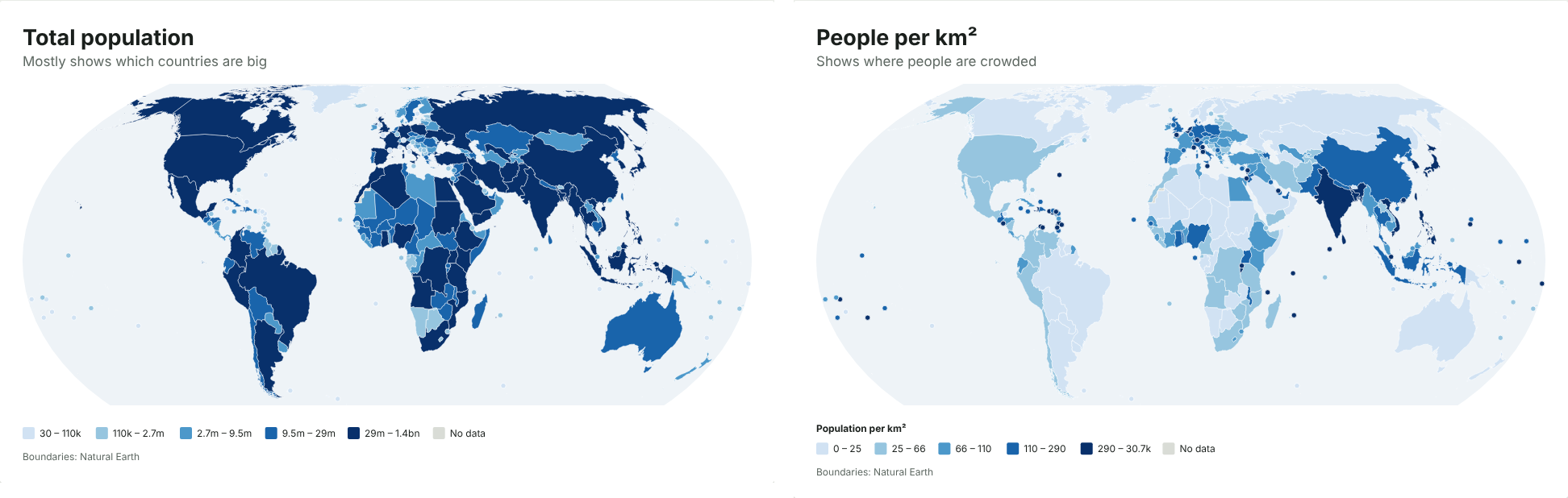
Totals are what statisticians call extensive variables: they grow with the size of the area. Rates are intensive: they don’t. A choropleth should almost always show a rate. Skipping this step is one of the most common mistakes in data maps; it made some COVID-19 dashboards misleading.
If what you really want to show is a total, use sized dots instead: one circle per area, its size set by the value. Readers judge a total by the size of a circle much better than by a shade of colour.
The JFDI map maker checks for this. If a column looks like a total (it rises and falls with population, or it’s called something like Total, Number or Deaths), it suggests showing it per million people, per km², or as sized dots. You can still keep it as it is.
Mistake 2: big areas shout
Even with a rate, every area is filled with one flat colour, so a large area looks like it carries more weight than a small one with the same value. Russia, Canada and the US Mountain West dominate maps because they’re big. Ten cities with high values can be invisible next to one empty county with a slightly lower one.
Ways to soften this:
- Equal-area projections. The Mercator projection used by web maps makes Greenland look as big as Africa, when Africa is about 14 times larger. Use an equal-area projection, such as Equal Earth, for any shaded map. The map maker warns you if you pick Mercator for one.
- Tile or hexagon maps, where every area gets the same space. These suit US states and UK constituencies. See why election maps use hexagons.
- A cartogram, where each area is sized by population.
- Small areas drawn as dots so places like Singapore or Malta don’t disappear.
Choosing the colour steps
How you split values into colours changes the story. The same data can look calm or alarming depending on where the breaks fall.
| Method | Use it when |
|---|---|
| Equal numbers of places per colour (quantiles) | Most data. Uses the full colour range. |
| Natural breaks | Values fall into clear clusters. |
| Equal-sized steps | Values are spread evenly, or round numbers matter. |
| Your own thresholds | A number means something, such as 50% or a target. |
| Smooth gradient | You want every difference visible. Add a log scale for data spanning several orders of magnitude. |
Use one light-to-dark colour ramp for values that run from low to high. Use a two-sided (diverging) ramp only when there’s a meaningful middle, such as zero change or the national average.
A quick checklist
Before you publish a shaded map, check that:
- It shows a rate, not a total (or uses sized dots for totals).
- It uses an equal-area projection.
- The colour steps are explained in the legend, and the breaks aren’t hiding the story.
- Areas with no data are a neutral grey, not the lightest colour.
- The title says what’s being measured and the source line says where it came from.