To map US county data, you need a column that identifies each county, ideally its five-digit FIPS code, and a column of values. Paste both into the JFDI map maker and it draws all of the roughly 3,200 counties and county-equivalents, with state borders on top. It’s free, there’s no account, and your spreadsheet isn’t uploaded.
Most problems with county maps come from the codes, not the map. Here’s how FIPS codes work and how to avoid the usual gaps.
What a FIPS code is
A county FIPS code has five digits: two for the state, then three for the county within it.
| County | State code | County code | FIPS |
|---|---|---|---|
| Autauga County, Alabama | 01 | 001 | 01001 |
| Los Angeles County, California | 06 | 037 | 06037 |
| Cook County, Illinois | 17 | 031 | 17031 |
| Miami-Dade County, Florida | 12 | 086 | 12086 |
Almost every US government dataset (Census Bureau, BLS, CDC, USDA) includes FIPS codes, often in a column called GEOID, FIPS or county_fips. Codes are more reliable than names, because many states share county names: there are dozens of Washington Counties and Jefferson Counties.
Step by step
- Get your data into two columns: the FIPS code (or county name) and the value. Extra columns are fine.
- Paste it into the map maker, or drop the CSV or Excel file on the page. It recognises county data and switches to the US county map on its own.
- Check the match count under Data. If any rows aren’t matched, press Fix to see why.
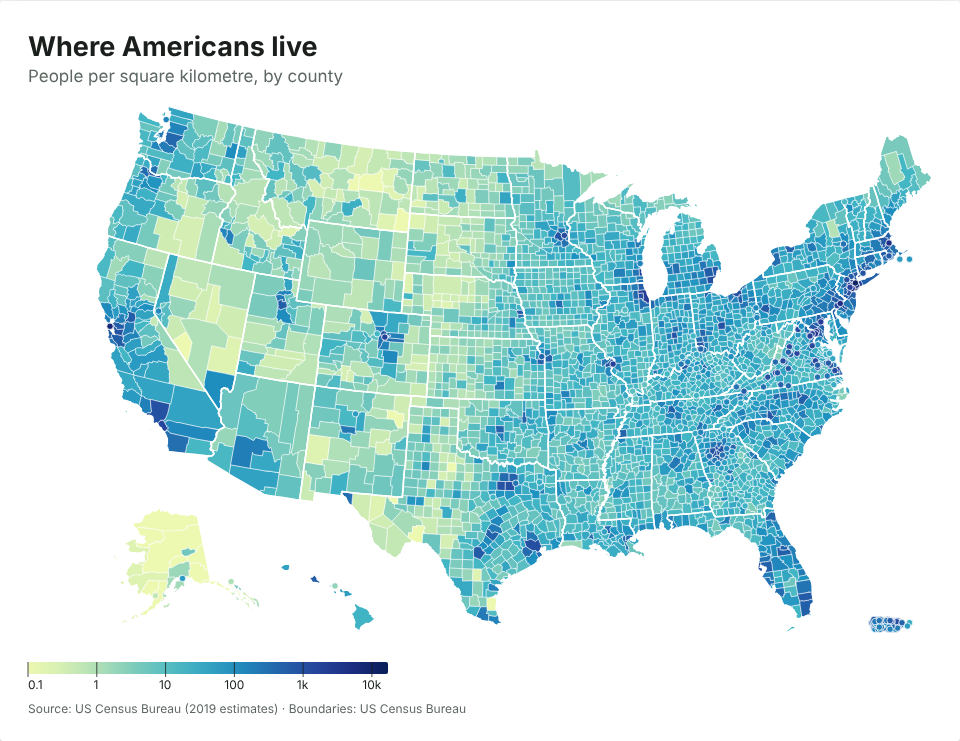
- Pick a scale. With 3,000 areas, a smooth gradient often reads better than steps. Turn on Log scale for things like population density that vary a thousandfold.
- Zoom if you need to. If all your data is in one state or a few neighbouring ones, the map zooms in automatically. You can choose the area yourself under Map › Area.
Mistake 1: Excel drops the leading zero
Open a CSV in Excel and 01001 becomes 1001. Every county in the seven states whose codes start with 0 (Alabama, Alaska, Arizona, Arkansas, California, Colorado and Connecticut) loses a digit. Joins in other tools then quietly fail for those states.
The map maker handles four-digit codes, so 1001 still finds Autauga County. If you need the zeros back for other work, the JFDI file converter keeps them when it turns a CSV into an Excel file. There’s a whole post on why Excel loses leading zeros and how to stop it.
Mistake 2: Connecticut’s counties no longer exist in the data
Connecticut replaced its eight counties with nine planning regions as county-equivalents. The Census Bureau began publishing data for the regions in 2023, starting with population estimates and the 2022 American Community Survey (CTData). The new codes run from 09110 to 09190:
| FIPS | Planning region |
|---|---|
| 09110 | Capitol |
| 09120 | Greater Bridgeport |
| 09130 | Lower Connecticut River Valley |
| 09140 | Naugatuck Valley |
| 09150 | Northeastern Connecticut |
| 09160 | Northwest Hills |
| 09170 | South Central Connecticut |
| 09180 | Southeastern Connecticut |
| 09190 | Western Connecticut |
The region boundaries don’t line up with the old counties, so there’s no honest way to draw old-county data (such as Fairfield County, 09001) on the current map. The map maker tells you this rather than guessing. If your data is older, you’ll need a pre-2022 boundary file, which you can load under Map › Use my own boundaries.
Mistake 3: Names that changed
A few counties have been renamed or split, and older datasets still use the old versions:
- Shannon County, South Dakota became Oglala Lakota County in 2015, with a new code. The map maker matches both.
- Dade County, Florida is Miami-Dade.
- Valdez-Cordova, Alaska split into Chugach and Copper River in 2019. The map shows the combined area, and data for the two new areas is suggested as part of it.
If you only have names
Names work, as long as the state is there too. All of these match:
Cook County, Illinois,Cook County, IL,Cook, IL- county in one column and state in another (the map maker pairs them up)
- parishes in Louisiana, boroughs and census areas in Alaska, and Virginia’s independent cities (Fairfax city and Fairfax County are different places)
A county name with no state only matches if just one county has that name.
Where to get county data
- data.census.gov for the American Community Survey (income, housing, commuting and much more)
- the Bureau of Labor Statistics’ Local Area Unemployment Statistics for monthly unemployment rates
- CDC WONDER for health data
Map rates (per person, per cent, per square mile) rather than totals: big counties otherwise look important just for being big. What is a choropleth map, and when does it mislead? explains why.